DevOps to DevSecOps: Fortifying Your Azure Pipeline with Microsoft Defender for Cloud
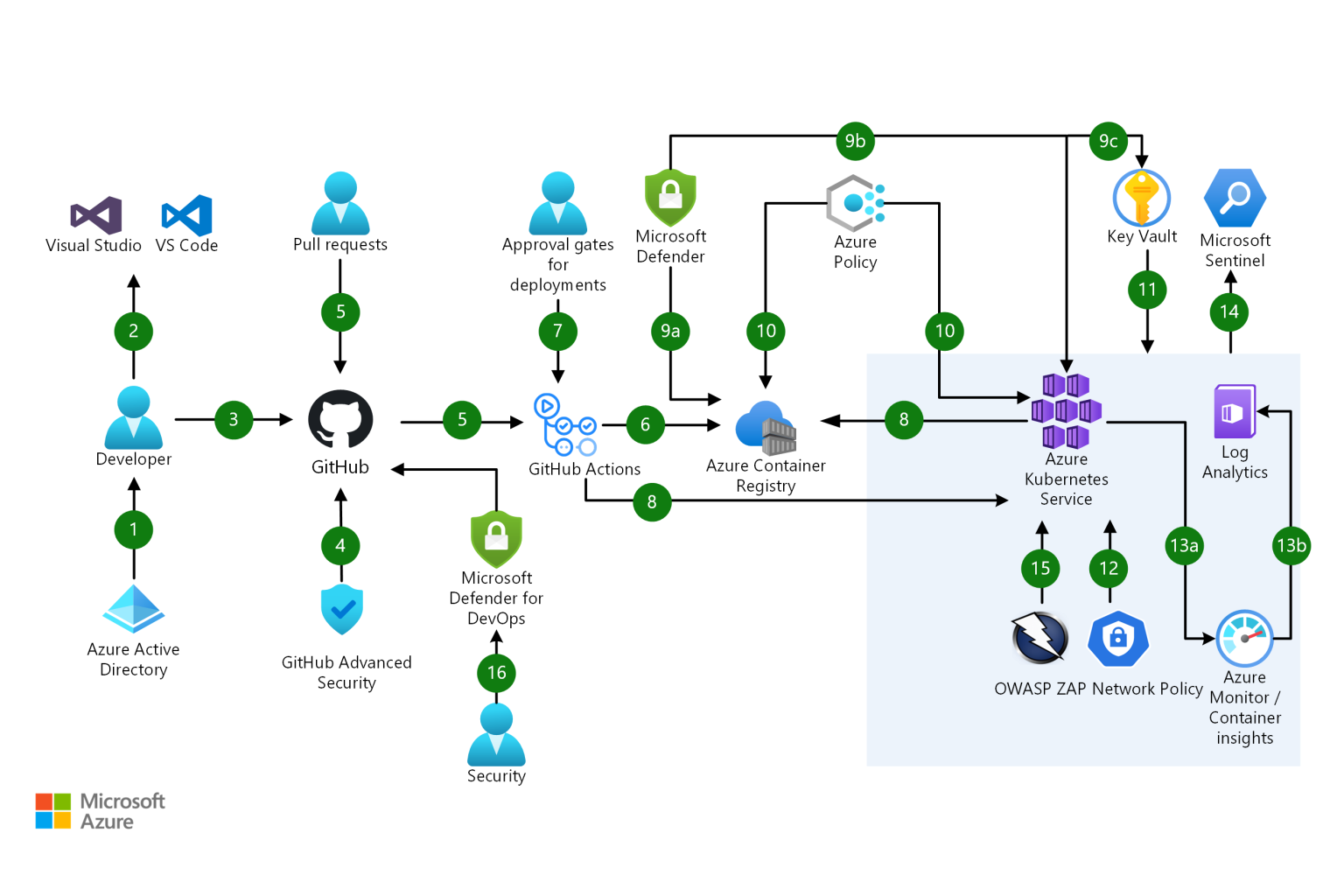
In the rapidly evolving landscape of cloud-native development, the mantra has shifted. Merely "shipping fast" is no longer enough — we need to ship securely. DevSecOps represents the evolution of DevOps: embedding security practices at every stage of the software development lifecycle rather than treating security as a final checkpoint or an afterthought.
Why DevSecOps Matters
Organizations that treat security as a downstream concern consistently face higher remediation costs, more significant vulnerabilities in production, and greater regulatory exposure. DevSecOps inverts this model — security considerations are embedded from the first commit, not bolted on before release.
The key benefits of a mature DevSecOps practice include:
- Early vulnerability detection — Identifying and remediating issues during development is orders of magnitude cheaper than addressing them post-deployment
- Regulatory alignment — Continuous compliance checking against frameworks such as GDPR and HIPAA becomes achievable rather than a periodic exercise
- Attack surface reduction — Proactive security controls reduce the number of exploitable vulnerabilities in production environments
- Faster innovation — Paradoxically, embedding security enables faster deployment by reducing late-stage rework and incident response overhead
Microsoft Defender for Cloud Capabilities
Microsoft Defender for Cloud is the Azure-native platform for cloud security posture management (CSPM) and cloud workload protection (CWP). It provides:
- Continuous scanning of Azure resources and workloads for security misconfigurations
- Threat detection across VMs, containers, databases, storage accounts, and App Service
- Compliance mapping against Azure Security Benchmark, CIS, NIST, and other frameworks
- Integrated vulnerability assessment for virtual machines and container images
- Multi-cloud support for AWS and GCP environments alongside Azure
Implementation Steps
Step 1: Enable and Configure Defender for Cloud
Activate Microsoft Defender for Cloud across your Azure subscriptions from the Azure portal. Configure the data collection agent on your virtual machines and enable the enhanced security plans relevant to your workload types — Defender for Servers, Defender for Containers, Defender for Databases, and Defender for App Service. Establish your security policies using the Azure Security Benchmark as your baseline, then customize thresholds to match your organizational risk tolerance.
Step 2: Integrate Security into Development Workflows
Security must live in the pipeline, not alongside it. Integrate the following into your CI/CD workflows:
- Static application security testing (SAST) tools that scan code on every commit
- Container image scanning before images are pushed to the registry
- Infrastructure-as-code (IaC) validation to detect misconfigurations in Bicep, Terraform, or ARM templates before deployment
- Security approval gates that block deployments failing defined security thresholds
Microsoft Defender for DevOps connects directly to GitHub and Azure DevOps, providing security findings within the developer's native workflow. GitHub Advanced Security and CodeQL provide additional code scanning capabilities for teams on GitHub Enterprise.
Step 3: Manage Vulnerabilities Proactively
Defender for Cloud surfaces a prioritized list of security recommendations across your environment. Establish a regular cadence for reviewing and remediating high-severity recommendations. Use automation rules to trigger remediation workflows for well-understood, low-risk findings. Conduct ongoing vulnerability assessments for your VM estate and container workloads, and track remediation progress against defined SLAs.
Step 4: Monitor and Respond
Centralize security logs from Defender for Cloud, Azure resources, and endpoint protection into Azure Monitor. Integrate with Microsoft Sentinel to enable advanced threat hunting using KQL queries and AI-powered anomaly detection. Develop incident response playbooks using Sentinel's automation capabilities — automated responses to common alerts reduce mean time to respond and ensure consistent handling of security events.
Step 5: Build a Security Culture
Technology alone cannot deliver DevSecOps. Train development teams on secure coding practices, threat modelling, and the security tools integrated into their workflows. Encourage open collaboration between security and development functions — security champions embedded within engineering teams are more effective than a centralized security team operating as a gatekeeper. Conduct regular security reviews and post-incident retrospectives to drive continuous improvement.
Conclusion
Implementing DevSecOps with Microsoft Defender for Cloud represents an essential evolution for any organization running workloads in Azure. The technical capabilities are mature, the integration with the Azure ecosystem is deep, and the business case — reduced breach risk, lower remediation costs, and faster confident deployment — is compelling.
Organizations that invest in this transformation today will be significantly better positioned for the security challenges of 2026 and beyond. AW InfraSec has implemented DevSecOps practices across numerous Azure environments and can guide your team through the journey.